Administrator is powerful on Windows, but it is not the highest trust level on the machine.
That becomes obvious the first time an elevated tool hits a process it cannot fully inspect. In Process Explorer, ordinary processes feel familiar: modules, handles, threads, token details, memory, image paths, loaded DLLs. Administrative tools can usually expose a lot of process state.
Then click one of the protected processes and the picture changes. The process is visible, but some details are missing. Some tabs get thin. Some operations fail. You are still administrator, but Windows is enforcing a boundary that administrator alone does not cross.
That behavior is not a bug in the tool. It is part of the security model.
Why does Windows let an administrator inspect most processes, but reject or constrain access to a special few?
The short version is that modern Windows process security is layered. The old model was mostly about the caller’s token and the target object’s security descriptor. Protected Processes added kernel-enforced restrictions above that. Protected Process Light (PPL) made protection hierarchical by introducing signer levels. Trustlets and Isolated User Mode (IUM) move some secrets into virtualization-backed isolation, where even the usual user-versus-kernel shorthand stops being enough.
Note: process lists, labels, defaults, event IDs, and UI behavior can vary by build, SKU, hardware, and policy. The commands below are meant to validate the model on your machine, not guarantee identical output everywhere.
Lab setup
You can follow most of this with built-in tools plus Sysinternals:
- Process Explorer
- an elevated PowerShell session
- Event Viewer
- optional: a kernel debugger attached to a lab VM
Use a lab system if you are going to change security settings. The inspection steps are safe, but enabling or disabling LSA protection, Credential Guard, HVCI, Secure Boot, or WDAC policies can affect compatibility and recovery.
The map
Here is the model before the details:
- Ordinary processes are mostly governed by the caller’s token, privileges, and the target process object’s security descriptor.
- Protected Processes are special processes where Windows filters sensitive access rights even if the caller is administrative.
- Protected Process Light keeps the protected-process idea, but adds signer levels so protected processes are not all equal.
- LSA protection is a practical use of PPL for
lsass.exe. - Credential Guard and Trustlets use virtualization-based isolation so some secrets are protected outside normal VTL0 process memory.
That is the progression this post follows.
Protected Processes arrived in Windows Vista. They were originally built for protected media scenarios, but the security idea is broader: some processes should not hand out sensitive access rights to ordinary user-mode callers, even administrative ones.
Protected Process Light arrived later, in Windows 8.1. PPL extends the protected-process access model, but adds type and signer information so Windows can distinguish different protected trust levels. That is what makes an LSA-protected process, an Antimalware-protected process, and a Windows-protected process different from each other.
LSA protection is the practical example most defenders recognize. When enabled, lsass.exe runs as a protected process light in the LSA signer category, so nonprotected processes cannot read LSASS memory or inject code into it.
Trustlets and Isolated User Mode arrived with Windows 10. They use virtualization-based isolation and VTL1 so secure processes, such as LsaIso.exe, can keep their user-mode pages isolated from VTL0 code.
Credential Guard builds on that VBS model. Instead of only making LSASS harder to open, it moves the secrets it protects behind an isolated LSA process.
The old model: admin plus debug privilege
The old mental model was not imaginary.
Microsoft’s Process Security and Access Rights documentation explains that when a caller opens a process, Windows checks the requested access rights against the process object’s security descriptor. It also states that to open another process with full access rights, the caller must enable SeDebugPrivilege.
That maps to a lot of traditional Windows debugging experience. If you had an elevated token, enabled debug privilege, and targeted an ordinary process, you could usually request broad process rights and get them.
Those rights are concrete. The same documentation lists access masks such as:
PROCESS_QUERY_INFORMATIONPROCESS_VM_READPROCESS_VM_WRITEPROCESS_VM_OPERATIONPROCESS_DUP_HANDLEPROCESS_CREATE_THREADPROCESS_SUSPEND_RESUMEPROCESS_TERMINATE
If a tool can open a process with rights like those, it can inspect memory, duplicate handles, inject code, create remote threads, suspend or terminate execution, or attach a debugger.
You can check the privilege side of that model from an elevated shell:
whoami /priv | findstr /i SeDebugPrivilege
On many systems you will see SeDebugPrivilege present in an elevated administrator token. Present does not always mean enabled by a given process, and the privilege is not an override for every modern boundary. It explains why older tools and older instincts often equated local administrator with broad process visibility.
Protected Processes changed the access check
Protected Processes were the first major break from that old expectation.
Windows Vista introduced protected processes for protected media and DRM scenarios. That origin story is not the part most defenders care about now, but it shows the architectural change: some processes became special enough that a normal administrator process should not be able to open them with the usual sensitive rights.
The enforcement happens in the kernel. This is not a user-mode convention that Process Explorer, Task Manager, or a debugger politely chooses to follow. Windows marks a process as protected, then restricts what access a caller can receive.
Microsoft’s process access documentation lists rights that are not allowed from an ordinary process to a protected process. The denied list includes sensitive rights such as PROCESS_CREATE_THREAD, PROCESS_DUP_HANDLE, PROCESS_QUERY_INFORMATION, PROCESS_VM_OPERATION, PROCESS_VM_READ, and PROCESS_VM_WRITE. It also notes that PROCESS_QUERY_LIMITED_INFORMATION exists to allow a smaller set of information to remain queryable.
So “protected” does not mean invisible. It means the handle rights you can obtain are intentionally limited.
Classic Protected Processes are not something an administrator can turn on for any executable. Microsoft’s process creation flags documentation documents the CREATE_PROTECTED_PROCESS flag, but also states that the binary must have a special Microsoft-provided signature that is not currently available for non-Microsoft binaries.
Experiment 1: find the protected processes
Start Process Explorer as administrator.
Right-click the process list header, choose Select Columns, and enable the Protection column. Then sort by it.
This gives an immediate visual cue that not all processes are operating under the same trust rules.
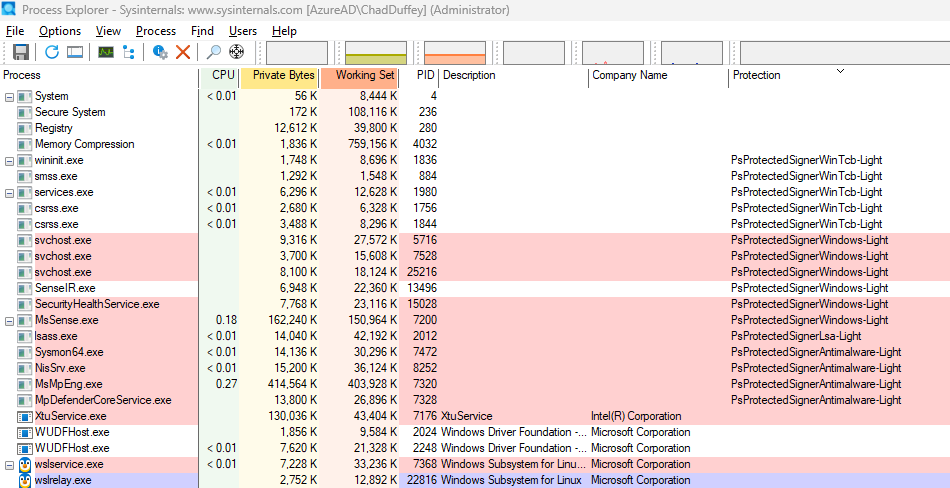
The exact entries depend on the machine. You may see ordinary processes with no protection value, protected or PPL processes with labels such as LSA or Antimalware, and possibly secure-process or VBS-related components if those features are enabled.
The exact list can change between machines. The useful part is that process protection is part of the runtime state of the machine.
PPL: protection becomes a signer hierarchy
Protected Process Light is where this stops being a simple protected-versus-unprotected model.
PPL is a lighter, more flexible protected-process model. It keeps the idea that Windows can restrict access to protected processes, but it adds type and signer information. That lets Windows distinguish between different protected trust levels instead of treating protection as a single yes-or-no value.
That changes the question from:
Is this process protected?
to:
What kind of protected process is this, and what signer level does it run with?
Public Windows headers expose some of these ideas through PROCESS_PROTECTION_LEVEL_INFORMATION, with values such as PROTECTION_LEVEL_WINDOWS_LIGHT, PROTECTION_LEVEL_ANTIMALWARE_LIGHT, PROTECTION_LEVEL_LSA_LIGHT, and PROTECTION_LEVEL_WINTCB_LIGHT.
Research by Alex Ionescu on the evolution of protected processes documents the underlying PS_PROTECTION model: a protected type plus a signer value, with signers such as Antimalware, Lsa, Windows, and WinTcb.
That matters because protected processes are not all peers. An anti-malware service needs enough protection that ordinary malware cannot stop the service or inject code into it. LSASS needs a different kind of protection because it handles credential material. Windows components at still higher trust levels need to interact with parts of the system that lower-trust protected processes should not control.
The signer level is not a string a program gets to declare for itself. Windows assigns the protection level only when the launch path and Code Integrity checks satisfy the rules for that protected category. A normal Authenticode signature does not let a process become WinTcb, Lsa, or Antimalware.
The anti-malware case shows the shape of the control. Microsoft documents that an anti-malware protected service needs an ELAM driver, registered certificate information, protected-service configuration, and Code Integrity validation before Windows launches it as protected. Once it is running, only Windows-signed code or code signed with the registered anti-malware vendor certificates can load into that protected service.
LSA protection is stricter in a different way. Microsoft documents that plug-ins loaded into protected LSA must be digitally signed with a Microsoft signature, and that unsigned or incorrectly signed plug-ins fail to load.
That makes the certificate question more concrete. A normal commercial code-signing certificate is not enough to become a high-trust PPL process. For the categories in this post, the legitimate paths are controlled: Windows and WinTcb are Microsoft-controlled; LSA plug-ins need a Microsoft signature through the documented WHQL or LSA file-signing path; anti-malware protected services need the ELAM and protected-service registration model described above. The result is more specific than “this file is signed.” It is “Windows recognizes this file, launch path, and signing policy as eligible for this protected category.”
For an attacker, that usually changes the problem. They are not realistically buying a normal certificate and choosing Lsa or WinTcb as a label. They would need to compromise a trusted signing or build pipeline, abuse a legitimate signed component, exploit a bug in the enforcement path, or move below the user-mode boundary with something like a vulnerable signed driver.
The hierarchy helps in two directions. It limits who can get powerful access to a protected process, and it limits what code can join that protected process. A malware author cannot claim “I am LSA-light now” and receive that trust. They would need to satisfy the relevant signing and launch requirements, or attack some stronger boundary such as Code Integrity, the kernel, or a vulnerable signed driver.
In practice, “is it protected?” is an incomplete question. The better question is:
Protected by what signer level, against which caller, for which access rights?
LSA protection is the easiest example to care about
lsass.exe is the example most people care about because it sits close to credential theft.
Microsoft’s LSA protection documentation says that on Windows 8.1 and later, added LSA protection prevents nonprotected processes from reading LSASS memory and injecting code. It also documents that there is no supported way to debug a running protected LSASS process.
That is the clean practical explanation for the administrator surprise:
If LSASS is running as a protected process, an unprotected administrative tool is still lower trust for sensitive process access.
On Windows 11, LSA protection may already be enabled depending on version, installation type, enterprise join state, HVCI capability, policy, and other conditions. Verify the state instead of assuming it.
Microsoft documents a simple verification point in Event Viewer:
- Open Event Viewer.
- Go to
Windows Logs>System. - Look for WinInit event ID
12. - The message should say
LSASS.exe was started as a protected process with level: 4.
You can also check with PowerShell:
Get-WinEvent -FilterHashtable @{ LogName = 'System'; Id = 12 } |
    Where-Object ProviderName -eq 'Microsoft-Windows-Wininit' |
    Select-Object -First 5 TimeCreated, Message
If you do not see that event, it does not automatically mean the machine is insecure. It means that event is not proof that LSASS is running as PPL on that system.
Experiment 2: probe the access rights
The visual test is useful, but a handle-rights test makes the boundary more concrete.
The script below starts Notepad, finds lsass.exe, and tries to open each process with a small set of access masks. It does not read memory, write memory, create a thread, or terminate anything. It only asks whether Windows will grant a handle with each requested right, then closes any handle it receives.
Run it from an elevated PowerShell session:
$source = @'
using System;
using System.Runtime.InteropServices;

public static class NativeProcessAccess
{
    [DllImport("kernel32.dll", SetLastError = true)]
    public static extern IntPtr OpenProcess(UInt32 desiredAccess, bool inheritHandle, UInt32 processId);

    [DllImport("kernel32.dll", SetLastError = true)]
    public static extern bool CloseHandle(IntPtr handle);
}
'@

if (-not ([System.Management.Automation.PSTypeName]'NativeProcessAccess').Type) {
    Add-Type -TypeDefinition $source
}

$rights = [ordered]@{
    PROCESS_QUERY_LIMITED_INFORMATION = 0x1000
    PROCESS_QUERY_INFORMATION         = 0x0400
    PROCESS_VM_READ                   = 0x0010
    PROCESS_VM_WRITE                  = 0x0020
    PROCESS_VM_OPERATION              = 0x0008
    PROCESS_CREATE_THREAD             = 0x0002
    PROCESS_TERMINATE                 = 0x0001
    PROCESS_DUP_HANDLE                = 0x0040
}

function Test-OpenProcessRight {
    param(
        [string]$Name,
        [int]$ProcessId
    )

    foreach ($right in $rights.GetEnumerator()) {
        $handle = [NativeProcessAccess]::OpenProcess([uint32]$right.Value, $false, [uint32]$ProcessId)
        $errorCode = [Runtime.InteropServices.Marshal]::GetLastWin32Error()

        if ($handle -ne [IntPtr]::Zero) {
            [NativeProcessAccess]::CloseHandle($handle) | Out-Null
            [pscustomobject]@{
                Process    = $Name
                Pid        = $ProcessId
                Right      = $right.Key
                Result     = 'Granted'
                Win32Error = 0
            }
        } else {
            [pscustomobject]@{
                Process    = $Name
                Pid        = $ProcessId
                Right      = $right.Key
                Result     = 'Denied'
                Win32Error = $errorCode
            }
        }
    }
}

$notepad = Start-Process notepad -PassThru
$lsass = Get-Process lsass

@(
    [pscustomobject]@{ Name = 'notepad'; Pid = $notepad.Id }
    [pscustomobject]@{ Name = 'lsass';   Pid = $lsass.Id }
) | ForEach-Object {
    Test-OpenProcessRight -Name $_.Name -ProcessId $_.Pid
} | Format-Table -AutoSize
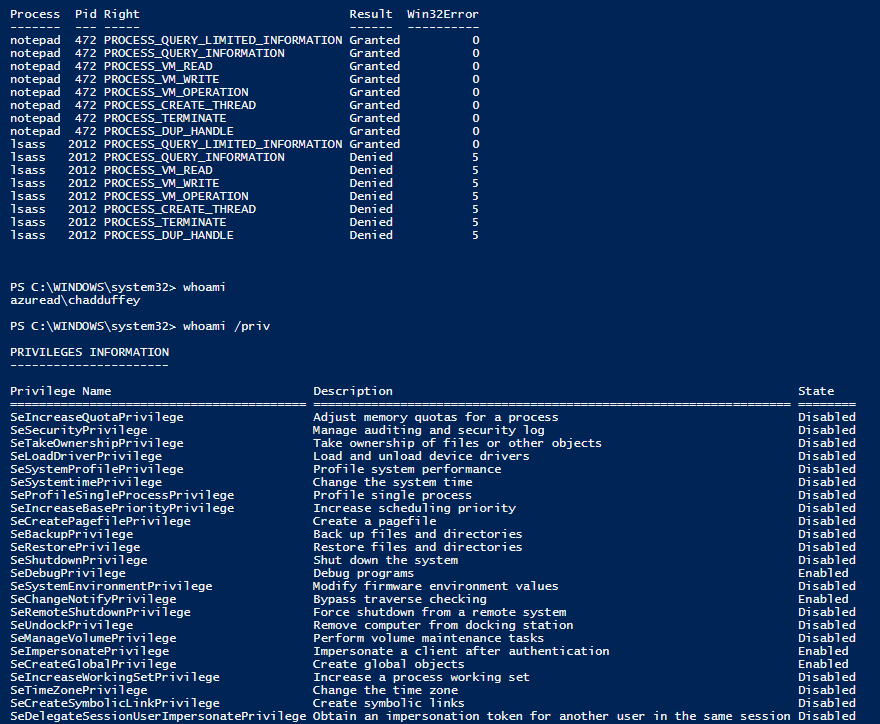
The exact output depends on the system and token state. The pattern is what matters. For an ordinary Notepad process, many of the requested rights should be granted. For LSASS running with protection, sensitive rights such as memory access, handle duplication, and thread creation should fail from an ordinary administrative process. Other rights, including termination, can vary by target and protection state, which is why the access-mask probe is useful.
If LSASS is not protected on your system, pick another process that Process Explorer clearly labels as protected or PPL and rerun the same probe against that PID.
PPL also controls what code may load
PPL is not only about who can open a handle. It also intersects with Code Integrity.
Microsoft’s anti-malware protected services documentation is a good example. Windows 8.1 introduced protected services so anti-malware user-mode services could opt into protected execution. Once the service is launched as protected, Windows uses Code Integrity to restrict what code can load into it, and nonprotected processes cannot inject threads or write into its virtual memory.
That is why PPL starts to feel adjacent to WDAC and App Control, even though PPL signer levels are not equivalent to ordinary WDAC allow or deny rules.
Code Integrity is the enforcement machinery that validates whether code is acceptable for a protected context. WDAC, now commonly referred to in Microsoft documentation as App Control for Business, is an administrator policy system that can define which code is allowed to run. They are related, but not identical.
Microsoft’s App Control event documentation makes the overlap visible. Event ID 3104 means a file under validation did not meet the signing requirements for a PPL process. Event ID 3086 is similar for an IUM process. The LSA protection documentation also points administrators at the Microsoft-Windows-CodeIntegrity/Operational log for events where plug-ins or drivers fail protected-mode signing requirements.
That gives defenders a practical place to look. When protected processes refuse code, Code Integrity telemetry may explain why.
Experiment 3: check the Code Integrity log
Open Event Viewer and browse to:
Applications and Services Logs > Microsoft > Windows > CodeIntegrity > Operational
Then filter for events such as:
3033: in the LSA protection docs, LSASS tried to load a driver that did not meet Microsoft signing-level requirements3063: in the LSA protection docs, LSASS tried to load a driver that did not meet shared-section requirements3086: a file did not meet IUM signing requirements3104: a file did not meet PPL signing requirements
Do not try to manufacture these events on a production machine. The useful habit is knowing where Windows reports the reason when a protected process refuses code. If you are piloting LSA protection, Microsoft also documents audit mode and the relevant Code Integrity events to check before enforcement.
Can these protections be enabled or disabled?
This is where the answer depends heavily on which protection is being discussed.
Classic Protected Processes are not a general administrative switch. The CREATE_PROTECTED_PROCESS flag exists, but the binary needs a special Microsoft signature. For ordinary software, that is not a practical “turn this on” option.
Anti-malware protected services are opt-in for qualifying anti-malware vendors. Microsoft’s documentation requires an Early Launch Anti-Malware driver, certificate information in the ELAM resource section, service registration, and ChangeServiceConfig2 with SERVICE_CONFIG_LAUNCH_PROTECTED. Once running as protected, the service cannot be stopped or reconfigured by an ordinary nonprotected process, even if that process is administrative. For servicing or uninstall, the protected service must cooperate by marking itself unprotected.
LSA protection is configurable. Microsoft documents registry, Group Policy, Intune, and CSP options. On a single machine, the registry path is:
HKEY_LOCAL_MACHINE\SYSTEM\CurrentControlSet\Control\Lsa
The value is RunAsPPL:
1: enable with UEFI lock2: enable without UEFI lock on Windows 11 version 22H2 and later
Disabling LSA protection depends on how it was enabled. Without UEFI lock, policy or registry can disable it after a reboot. With UEFI lock, the setting is stored in firmware and requires Microsoft documented opt-out steps. Secure Boot state matters here, so this is not something to casually toggle on a production machine.
Credential Guard and VBS are also configurable, but they are a separate layer from PPL. Microsoft documents Intune, Group Policy, and registry options for Credential Guard. Starting in Windows 11 version 22H2 and Windows Server 2025, Credential Guard is enabled by default on devices that meet the requirements unless explicitly disabled. If Credential Guard is enabled with UEFI lock, disabling it is more involved and requires the documented UEFI-variable removal flow.
HVCI, shown in the Windows UI as Memory Integrity, is another VBS-backed feature. It is not the same thing as PPL, but it matters in the same defensive neighborhood because it helps protect kernel-mode code integrity. Microsoft documents enablement through Windows Security, Intune, Group Policy, registry, and App Control policy. Microsoft also documents recovery steps because driver incompatibility can prevent a system from booting cleanly after HVCI is enabled.
The kernel debugger sees a different layer
At this point it is tempting to say “the process cannot be inspected.” That is too broad.
A normal user-mode administrative tool is constrained by process access checks. A kernel debugger in a lab is operating from a different context. That contrast shows that protected processes are not absent or structurally unknowable. They are normal process objects with extra protection state that affects which callers can receive sensitive access.
Microsoft’s anti-malware protected service documentation uses a kernel debugger to inspect the Protection field inside EPROCESS:
dt -r1 nt!_EPROCESS <ProcessAddress> Protection
On a lab VM with symbols configured, you can use a flow like this. First list processes and find the lsass.exe entry:
!process 0 0
Then use the process address from that output:
dt -r1 nt!_EPROCESS <ProcessAddress> Protection
The field layout can change between builds, which is why the debugger command asks symbols to resolve the structure instead of relying on a fixed offset. The protection value is part of kernel process state, not a UI label invented by Process Explorer.
Trustlets move the boundary again
PPL still lives in the normal NT/VTL0 world. Trustlets are a different step.
Microsoft’s Isolated User Mode documentation explains that Windows 10 introduced Virtual Secure Mode (VSM), which uses the Hyper-V hypervisor and SLAT to create Virtual Trust Levels. Traditional kernel and user-mode code runs in VTL0. The secure kernel and IUM code run in VTL1, which is more privileged than VTL0.
The same documentation describes Trustlets, also called trusted processes, secure processes, or IUM processes, as programs running in IUM. Their user-mode pages are isolated in VTL1 from drivers running in the VTL0 kernel. Microsoft states that even if VTL0 kernel mode is compromised, the malware does not have access to IUM process pages.
Credential Guard is the familiar example. Microsoft’s Credential Guard documentation says that with Credential Guard enabled, the LSA process talks to an isolated LSA process, LsaIso.exe, which stores and protects secrets. That data is protected using VBS and is not accessible to the rest of the operating system.
That is a different kind of boundary from PPL.
PPL can explain why an unprotected administrator process cannot get powerful rights into lsass.exe. Trustlets and IUM explain why the secrets protected by Credential Guard are not exposed to ordinary VTL0 process memory in the same way.
Experiment 4: check whether VBS is running
You can check the VBS state with msinfo32.exe. Look for the Virtualization-based security row. Microsoft also documents a PowerShell method using the Win32_DeviceGuard WMI class:
Get-CimInstance -ClassName Win32_DeviceGuard -Namespace root\Microsoft\Windows\DeviceGuard |
    Select-Object VirtualizationBasedSecurityStatus, SecurityServicesConfigured, SecurityServicesRunning
For VirtualizationBasedSecurityStatus, Microsoft documents:
0: VBS is not enabled1: VBS is enabled but not running2: VBS is enabled and running
For SecurityServicesRunning, Microsoft documents values such as:
1: Credential Guard is running2: Memory Integrity is running3: System Guard Secure Launch is running
Microsoft specifically recommends System Information, PowerShell, or Event Viewer to verify Credential Guard. Seeing LsaIso.exe can be a useful clue, but Task Manager is not the recommended verification method.
What research says about these boundaries
It would be misleading to finish here and imply that PPL or VBS makes a machine untouchable.
A more accurate statement is:
PPL raises the required attacker position above ordinary administrative user-mode access. It does not make a compromised machine safe from every stronger attacker position.
There are three categories of research worth keeping in mind.
First, there has been public user-mode research against PPL assumptions. James Forshaw’s Project Zero post on Windows object directory creation and KnownDlls behavior included an Administrator-to-PPL angle. SCRT later wrote a detailed LSA protection bypass in userland. In 2022, itm4n’s “The End of PPLdump” showed that Microsoft had changed loader behavior in a way that broke that specific PPLdump approach on newer builds.
That does not make PPL useless. It means PPL details matter, and Windows changes over time.
Second, kernel execution changes the boundary. If an attacker can execute code in the kernel, or can abuse a vulnerable signed driver to get kernel read/write capability, user-mode process protections are no longer the same barrier. That is the BYOVD problem: bring your own vulnerable driver.
Microsoft documents the recommended vulnerable driver blocklist, but also cautions that the blocklist is not guaranteed to block every vulnerable driver. Microsoft recommends explicit allow-listing where possible and notes that HVCI, Smart App Control, S mode, and App Control policies can play a role in enforcement.
This shows up in real incidents and research. The LOLDrivers project tracks Windows drivers used by adversaries to bypass security controls. At the time of writing, it listed 2,129 driver samples and 619 unique drivers. Academic research has also caught up: the NDSS 2026 paper “Unveiling BYOVD Threats: Malware’s Use and Abuse of Kernel Drivers” analyzed 8,779 malware samples that load 773 signed drivers and reported previously unknown vulnerable drivers to Microsoft, vendors, and threat-intelligence platforms.
A recent example shows the same pattern. Quarkslab’s 2025 write-up on CVE-2025-8061 in a signed Lenovo driver describes BYOVD as a common post-exploitation technique used to bypass mitigations, including PPL, by reaching Ring 0. Their own note that HVCI mitigated part of the demonstrated exploitation is a good reminder that these protections are meant to stack.
Third, VBS and Trustlets are stronger boundaries, but still have an attack surface. Microsoft’s VSM documentation is explicit that the hypervisor creates isolated memory regions and VTLs. Public research such as Rafal Wojtczuk’s Black Hat paper, “Analysis of the Attack Surface of Windows 10 Virtualization-Based Security”, looked at that architecture and its assumptions. The paper is old enough that many implementation details have changed, but the high-level lesson is still useful: virtualization-backed isolation narrows and moves the attack surface; it does not remove the need to understand the trust boundary.
The model that survives the lab
For ordinary processes, administrator plus the right privileges can still mean broad process access.
For Protected Processes, Windows filters sensitive process access rights even when the caller is administrative.
For PPL, the caller’s protection level and signer trust matter, not only the user’s token.
For LSA protection, that hierarchy is used to make ordinary LSASS memory access and injection fail from admin tooling that is not running at the right protection level.
For Credential Guard and Trustlets, some secrets move behind VBS-backed isolation, where VTL1 is intentionally outside the reach of normal VTL0 code.
That is why “administrator can inspect anything” is no longer a good Windows mental model.
Administrator is still powerful. Kernel execution is still extremely serious. But modern Windows has spent years moving sensitive components behind trust boundaries that are deliberately higher than ordinary administrative user mode.
